function pageLoad(sender, e)
{
if (!e.get_isPartialLoad())
{

}
}
Thursday, May 7, 2009
IsPostBack for Client-Side Code
In client-side code, I needed to determine whether the pageLoad function was being run the first time the page was loaded or on a subsequent postback. Searching around, many said there was no such function. But then I came across one posting which illustrated that there indeed is ... at least to detect partial postbacks:

Saturday, May 2, 2009
How to Get jQuery Intellisense Working with VS2008
Intellisense provides great assistance with anyone starting out with a new programming language. Learning jQuery from scratch, I've found this very much to be the case. Oh sure, one can develop in any language without such assistance. In fact, I have fond memories of teaching myself AutoLISP in the "ancient" year of 1990. Back then there was no Windows and the main IDE was the DOS equivalent of Notepad!
Anyhow, things have changed quite a bit since then and I immediately knew it would be great to have Intelisense working for jQuery! There are several steps involved though but through much trial & error I've finally got it working properly. Hopefully others will benefit from my efforts.
How Do You Know if jQuery Intellisense is Working?
Simply go to a location where you'd normally enter Javascript code and type a dollar sign ("$"). A pop-up menu will appear. What it displays gives you an immediate indication of whether jQuery Intellisense is functioning. Here's a development environment where it's not working:
 And here's one where it is working:
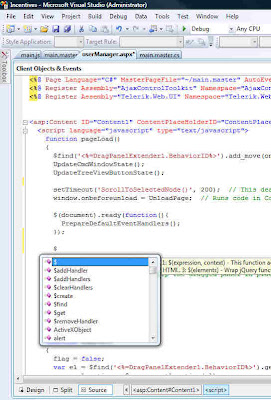 In the second screenshot, notice that the first item is a single "$". This is positive! If you wanted to test it further, you could type a little more, like: $("div").
Something akin to the following should then appear in the pop-up menu:
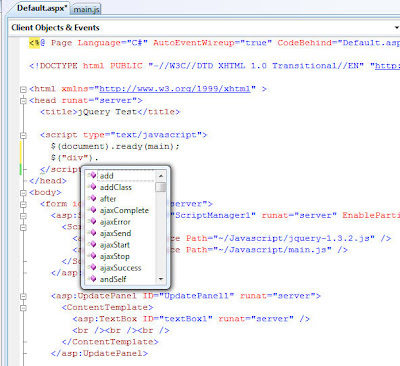 Important Note: Every time I first load a project/solution into VS2008, the jQuery Intellisense does NOT work on the initial try!! I have to clear that menu, wait a few seconds and then try again. From then on it works perfectly, showing the single "$" as the first item in the pop-up menu.
Getting jQuery Intellisense Up & Running
Referencing the jQuery Library and the jQuery Intellisense File
I'm a big believer in:
 Notice that there's a "Javascript" folder, which contains the jQuery Intellisense file, the jQuery library file, and an external Javascript file. Based on this file arrangement, either of the following approaches will work with an ASP.Net AJAX application:
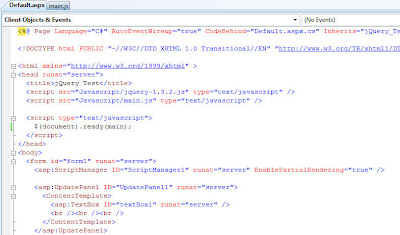
 You might be wondering why there's no reference to the jQuery Intellisense file? Well, as long as it follows the filename syntax shown in Step #4 above then it is automatically detected and loaded.
Accessing jQuery Intellisense in an External Javascript File
As mentioned previously, I like to place as much Javascript (and jQuery) code into external Javascript files (those ending in ".js") as is practical. If you use the same approach then you will face a disappointment if you're expecting Intellisense to work properly in such a file:
 No jQuery Intellisense there!
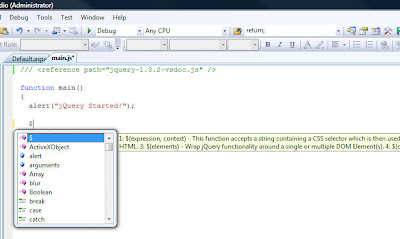
The solution is very simple though. Just add a reference like this to the top of the file:
Then the Intellisense you enjoy in ASPX files will also work in external Javascript files too! Here's an example:
Final Caveat
A little while ago I presented a way to programatically load jQuery entirely from server-side code. It does work and is powerful because a common server-side method could be built and then used in all of your projects. But jQuery Intellisense will not work using that approach; at least not with VS2008. Perhaps that will change in VS2010!
Anyhow, things have changed quite a bit since then and I immediately knew it would be great to have Intelisense working for jQuery! There are several steps involved though but through much trial & error I've finally got it working properly. Hopefully others will benefit from my efforts.
How Do You Know if jQuery Intellisense is Working?
Simply go to a location where you'd normally enter Javascript code and type a dollar sign ("$"). A pop-up menu will appear. What it displays gives you an immediate indication of whether jQuery Intellisense is functioning. Here's a development environment where it's not working:
 And here's one where it is working:
 In the second screenshot, notice that the first item is a single "$". This is positive! If you wanted to test it further, you could type a little more, like: $("div").
Something akin to the following should then appear in the pop-up menu:
 Important Note: Every time I first load a project/solution into VS2008, the jQuery Intellisense does NOT work on the initial try!! I have to clear that menu, wait a few seconds and then try again. From then on it works perfectly, showing the single "$" as the first item in the pop-up menu.
Getting jQuery Intellisense Up & Running
- Ensure that VS2008 SP1 is installed. (Further info)
- Ensure that Hotfix KB958502 is installed. (Further info)
- Install the jQuery library into your project. It'll have a filename like "jquery-1.3.2.js".
- Install the jQuery Intellisense file into your project. It may very well have a filename like "jquery-1.3.2-vsdoc2.js" but must be renamed to be identical to the jQuery library name, plus "-vsdoc". Thus in this example, it must be renamed to "jquery-1.3.2-vsdoc.js".
- Provide a reference to the jQuery library. There are generally two ways to do this, both of which are described below.
- In external Javascript files a direct reference to the jQuery Intellisense file must be made. More details are provided below.
Referencing the jQuery Library and the jQuery Intellisense File
I'm a big believer in:
- Organizing a project's files into as many sub-folders as makes sense.
- Separating programming code from markup code as much as possible.
 Notice that there's a "Javascript" folder, which contains the jQuery Intellisense file, the jQuery library file, and an external Javascript file. Based on this file arrangement, either of the following approaches will work with an ASP.Net AJAX application:
 You might be wondering why there's no reference to the jQuery Intellisense file? Well, as long as it follows the filename syntax shown in Step #4 above then it is automatically detected and loaded.
Accessing jQuery Intellisense in an External Javascript File
As mentioned previously, I like to place as much Javascript (and jQuery) code into external Javascript files (those ending in ".js") as is practical. If you use the same approach then you will face a disappointment if you're expecting Intellisense to work properly in such a file:
 No jQuery Intellisense there!
The solution is very simple though. Just add a reference like this to the top of the file:
/// <reference path="jquery-1.3.2-vsdoc.js" />
Then the Intellisense you enjoy in ASPX files will also work in external Javascript files too! Here's an example:

Final Caveat
A little while ago I presented a way to programatically load jQuery entirely from server-side code. It does work and is powerful because a common server-side method could be built and then used in all of your projects. But jQuery Intellisense will not work using that approach; at least not with VS2008. Perhaps that will change in VS2010!
Mea Culpa re jQuery Intellisense
Prior to direct integration into their Visual Studio product, Microsoft has gone to great lengths to make jQuery easy to use with VS2008. More specifically, they've provided a special patch that provides Intellisense support for jQuery development.
Try as I might though, I just couldn't get it installed on my computer. Whenever I tried, it told me that the supported product was not installed on my machine. Naturally I thought this was because I was running the 64-bit edition of Vista, which has caused some minor compatibility problems before.
I was incorrect. Thanks to the persistence of two Microsoft employees, Vishal Joshi and Joe Cartano, I finally realized my error: I did not have VS2008 SP1 installed. I thought I did for several reasons, not the least of which was because it was not appearing in Windows Update. In fact, when I first looked at the About screen to check, I saw "SP1" there ... but only later realized that it was for the .Net Framework v3.5, not for Visual Studio itself! Here's a screenshot showing you what to look for:
 If that "SP" (circled in red) is not present then it's not installed.
So I installed SP1. It took about 20 minutes and then I had to restart Windows. After that I ran the patch, which is also known as "Hotfix KB958502". This time it recognized VS2008 and ran perfectly fine.
There is more to do though to get jQuery Intellisense working. I will describe the steps in my next post.
Try as I might though, I just couldn't get it installed on my computer. Whenever I tried, it told me that the supported product was not installed on my machine. Naturally I thought this was because I was running the 64-bit edition of Vista, which has caused some minor compatibility problems before.
I was incorrect. Thanks to the persistence of two Microsoft employees, Vishal Joshi and Joe Cartano, I finally realized my error: I did not have VS2008 SP1 installed. I thought I did for several reasons, not the least of which was because it was not appearing in Windows Update. In fact, when I first looked at the About screen to check, I saw "SP1" there ... but only later realized that it was for the .Net Framework v3.5, not for Visual Studio itself! Here's a screenshot showing you what to look for:
 If that "SP" (circled in red) is not present then it's not installed.
So I installed SP1. It took about 20 minutes and then I had to restart Windows. After that I ran the patch, which is also known as "Hotfix KB958502". This time it recognized VS2008 and ran perfectly fine.
There is more to do though to get jQuery Intellisense working. I will describe the steps in my next post.
Friday, May 1, 2009
Setting Default Focus to the Correct TextBox in a Login Control
If you're using the ASP.Net Login control then your login page may look something like this:

The username, by the way, was automatically placed into the textbox via a cookie. And though it's not immediately visible in the above screenshot, the cursor is in the Password textbox via the server-side SetFocus() method. The user, upon being presented with this screen, can then just type their password and press Enter.
Now look at this next screenshot:
 Not only is the cursor in the Password textbox like before, but the background color of the textbox is automatically highlighted to provide another visual cue. This highlighting was done globally with jQuery with just a few lines of code.
All good so far. But I discovered that the jQuery auto-highlighting did not work when a page was first loaded. I still do not know why but suspect that the server-side SetFocus() method does not raise the client-side 'focus' event.
Solving the problem meant moving the code the server to the client. Here's what worked for me:
<script language="javascript" type="text/javascript">
function pageLoad()
{
$(document).ready(function(){
PrepareDefaultEventHandlers();
var textBoxUserName = $('#<%= Login1.FindControl("UserName").ClientID %>')[0];
if (textBoxUserName.value == "")
textBoxUserName.focus();
else
{
var textBoxPassword = $('#<%= Login1.FindControl("Password").ClientID %>')[0];
textBoxPassword.focus();
}
});
}
</script>
A big thanks to Dave Ward at Encosia for his invaluable help with this!
The username, by the way, was automatically placed into the textbox via a cookie. And though it's not immediately visible in the above screenshot, the cursor is in the Password textbox via the server-side SetFocus() method. The user, upon being presented with this screen, can then just type their password and press Enter.
Now look at this next screenshot:
 Not only is the cursor in the Password textbox like before, but the background color of the textbox is automatically highlighted to provide another visual cue. This highlighting was done globally with jQuery with just a few lines of code.
All good so far. But I discovered that the jQuery auto-highlighting did not work when a page was first loaded. I still do not know why but suspect that the server-side SetFocus() method does not raise the client-side 'focus' event.
Solving the problem meant moving the code the server to the client. Here's what worked for me:
<script language="javascript" type="text/javascript">
function pageLoad()
{
$(document).ready(function(){
PrepareDefaultEventHandlers();
var textBoxUserName = $('#<%= Login1.FindControl("UserName").ClientID %>')[0];
if (textBoxUserName.value == "")
textBoxUserName.focus();
else
{
var textBoxPassword = $('#<%= Login1.FindControl("Password").ClientID %>')[0];
textBoxPassword.focus();
}
});
}
</script>
A big thanks to Dave Ward at Encosia for his invaluable help with this!
Monday, April 27, 2009
Using Fiddler with Visual Studio 2008
Fiddler is a great tool but when I tried to use it to monitor a Visual Studio 2008 web app running locally on my Vista 64-bit computer, it did not work.
I searched around some and finally found this blog posting. Within the comments a fellow suggested changing the URL to this syntax:
http://ipv4.fiddler:1234/MyApp...
I assume this is intercepting traffic in between Fiddler and VS2008. Whatever the case, it works!
I searched around some and finally found this blog posting. Within the comments a fellow suggested changing the URL to this syntax:
http://ipv4.fiddler:1234/MyApp...
I assume this is intercepting traffic in between Fiddler and VS2008. Whatever the case, it works!
Sunday, April 26, 2009
Smart Redirection
I have a situation where I have a test server running on my home network. I was using it to host just one application but when I wanted to do so with 2 or more, I ran into a problem because external URLs could only be redirected to the root folder.
After some experimenting I found a simple solution that seems to work very well:
- In the root of Inetpub/wwwroot either remove "default.htm" or change the priority order so that "default.aspx" appears first.
- Install into this root folder the two files shown below, Default.aspx and Default.aspx.cs
- Then with your IP redirection, use this format: http://your_local_IP_address?app=folder_name - Example: http://24.81.19.172?app=MyTestApp
It's not perfect in that it requires one to add the "app" parameter & value but other than that, it works well. If someone has a simpler solution, I'd love to see it!
Here's the contents of the two required files:
Default.aspx
<%@ Page Language="C#" AutoEventWireup="true" CodeFile="Default.aspx.cs" Inherits="_Default" %>
<!DOCTYPE html PUBLIC "-//W3C//DTD XHTML 1.0 Transitional//EN" "http://www.w3.org/TR/xhtml1/DTD/xhtml1-transitional.dtd">
<html xmlns="http://www.w3.org/1999/xhtml">
<head runat="server">
<title></title>
</head>
<body>
<form id="form1" runat="server">
<div>
</div>
</form>
</body>
</html>
Default.aspx.cs
using System;
using System.Web;
public partial class _Default : System.Web.UI.Page
{
protected void Page_Load(object sender, EventArgs e)
{
string targetFolder = "/MyMajorTestApp"; // Default app to run, in case not "app" parameter is provided
if (Request.Params["app"] != null)
targetFolder = "/" + Request.Params["app"];
HttpContext.Current.Response.Redirect(targetFolder, true);
}
}
Friday, April 24, 2009
2 Ways to Load jQuery from an ASP.Net Master Page
If you're getting started with using jQuery in ASP.Net, you'll probably come across a situation where you would like to load it from a Master Page so that it's available globally for all Content Pages. When you do so you'll find that you get assorted errors for different reasons.
After reading many articles and much trial & error I have determined two different approaches to get it working. Note: My preference is to separate all code from the markup as much as possible. So directly in the root of all my projects is a folder called "Javascript". Inside it I always place [at least] these 3 files:
Approach #1: Entirely from the Markup Page
<head runat="server">
<title></title>
<asp:ContentPlaceHolder ID="placeHolder1" runat="server">
<script src="<%= Page.ResolveUrl("~/JavaScript/jquery-1.3.2.js") %>" language="javascript" type="text/javascript"></script>
</asp:ContentPlaceHolder>
<asp:ContentPlaceHolder ID="ContentPlaceHolder1" runat="server">
<script src="<%= Page.ResolveUrl("~/JavaScript/jquery-vsdoc.js") %>" language="javascript" type="text/javascript"></script>
</asp:ContentPlaceHolder>
<asp:ContentPlaceHolder ID="ContentPlaceHolder2" runat="server">
<script src="<%= Page.ResolveUrl("~/JavaScript/main.js") %>" language="javascript" type="text/javascript"></script>
</asp:ContentPlaceHolder>
</head>
<body onload="$(document).ready(main)">
Approach #2: Entirely from Server-side Code
protected void Page_Load(object sender, EventArgs e)
{
AddScript(Page.ResolveUrl("~/JavaScript/jquery-1.3.2.js"));
AddScript(Page.ResolveUrl("~/JavaScript/jquery-vsdoc.js"));
AddScript(Page.ResolveUrl("~/JavaScript/main.js"));
string jScript = "$(document).ready(main);";
ScriptManager.RegisterStartupScript(Page, Page.GetType(),
Guid.NewGuid().ToString(), jScript, true);
}
private void AddScript(string src)
{
HtmlGenericControl genCtrl = new HtmlGenericControl();
genCtrl.TagName = "script";
genCtrl.Attributes.Add("type", "text/javascript");
genCtrl.Attributes.Add("language", "javascript");
genCtrl.Attributes.Add("src", src);
Page.Header.Controls.Add(genCtrl);
}
I hope this helps others! Please be aware that most everything above applies generically to all Javascript code, not just jQuery.
After reading many articles and much trial & error I have determined two different approaches to get it working. Note: My preference is to separate all code from the markup as much as possible. So directly in the root of all my projects is a folder called "Javascript". Inside it I always place [at least] these 3 files:
- jquery-1.3.2.js
- jquery-vsdoc.js
- main.js
Approach #1: Entirely from the Markup Page
<head runat="server">
<title></title>
<asp:ContentPlaceHolder ID="placeHolder1" runat="server">
<script src="<%= Page.ResolveUrl("~/JavaScript/jquery-1.3.2.js") %>" language="javascript" type="text/javascript"></script>
</asp:ContentPlaceHolder>
<asp:ContentPlaceHolder ID="ContentPlaceHolder1" runat="server">
<script src="<%= Page.ResolveUrl("~/JavaScript/jquery-vsdoc.js") %>" language="javascript" type="text/javascript"></script>
</asp:ContentPlaceHolder>
<asp:ContentPlaceHolder ID="ContentPlaceHolder2" runat="server">
<script src="<%= Page.ResolveUrl("~/JavaScript/main.js") %>" language="javascript" type="text/javascript"></script>
</asp:ContentPlaceHolder>
</head>
<body onload="$(document).ready(main)">
Approach #2: Entirely from Server-side Code
protected void Page_Load(object sender, EventArgs e)
{
AddScript(Page.ResolveUrl("~/JavaScript/jquery-1.3.2.js"));
AddScript(Page.ResolveUrl("~/JavaScript/jquery-vsdoc.js"));
AddScript(Page.ResolveUrl("~/JavaScript/main.js"));
string jScript = "$(document).ready(main);";
ScriptManager.RegisterStartupScript(Page, Page.GetType(),
Guid.NewGuid().ToString(), jScript, true);
}
private void AddScript(string src)
{
HtmlGenericControl genCtrl = new HtmlGenericControl();
genCtrl.TagName = "script";
genCtrl.Attributes.Add("type", "text/javascript");
genCtrl.Attributes.Add("language", "javascript");
genCtrl.Attributes.Add("src", src);
Page.Header.Controls.Add(genCtrl);
}
I hope this helps others! Please be aware that most everything above applies generically to all Javascript code, not just jQuery.
Wednesday, April 22, 2009
Upgrading Crystal Reports Files from VS2005 to VS2008
I just upgraded a fairly large project from Visual Studio 2005 to 2008. Everything went fairly smoothly but I did encounter hundreds of errors when I got around to upgrading the Crystal Reports data files.
In VS2005 I have a pair of files for each report:
In VS2008, when you bring an XSD file into a project it creates 3 other files:
In point of fact, all the conflicts occured within the ".Designer.cs" files. There are global variables in each one that cause repeat definitions of the same variables, which is not allowed.
So I did a little research and came across this blog entry. I ended up following just the first part, which was to delete the ".Designer.cs" and ".xss" files. Plus, because all the ".xsc" files were empty, I deleted them too.
Lo and behold, I rebuilt the solution but these excess files were never recreated. More importantly, the reports worked perfectly once again!
Update: One problem I've discovered with the above procedure is that you still end up with one warning message per report like this:
The custom tool 'MSDataSetGenerator' failed while processing the file 'Reports\Templates\MTHOBRK3.xsd'.
The application still runs but I don't like any such warning messages to be present. After a little trial & error I found this to be the ultimate solution:
namespace Website.Reports.Templates
{
public partial class NewDataSet
{
}
}
#pragma warning restore 1591
In VS2005 I have a pair of files for each report:
- ReportName.rpt
- ReportName.xsd
In VS2008, when you bring an XSD file into a project it creates 3 other files:
- ReportName.Designer.cs
- ReportName.xsc
- ReportName.xss
In point of fact, all the conflicts occured within the ".Designer.cs" files. There are global variables in each one that cause repeat definitions of the same variables, which is not allowed.
So I did a little research and came across this blog entry. I ended up following just the first part, which was to delete the ".Designer.cs" and ".xss" files. Plus, because all the ".xsc" files were empty, I deleted them too.
Lo and behold, I rebuilt the solution but these excess files were never recreated. More importantly, the reports worked perfectly once again!
Update: One problem I've discovered with the above procedure is that you still end up with one warning message per report like this:
The custom tool 'MSDataSetGenerator' failed while processing the file 'Reports\Templates\MTHOBRK3.xsd'.
The application still runs but I don't like any such warning messages to be present. After a little trial & error I found this to be the ultimate solution:
- Delete the .xsc & .xss files only.
- Replace the entire contents of each .Designer.cs file with the following:
namespace Website.Reports.Templates
{
public partial class NewDataSet
{
}
}
#pragma warning restore 1591
Thursday, April 9, 2009
Using runat="server" with HTML Elements
ASP.Net developers know that in their markup pages they can use a combination of HTML Elements and ASP.Net Controls. The syntax is mildly different but there is one major distinction:
Whereas HTML Elements do not. Or at least that's what I thought!
I have a web app that utilizes a left menu to display modules to the user:
 It works great, but before the user is logged in, it makes no sense to display it. Up until now I was just hiding the menu itself. This was fine but what was left was the table column behind. This is what it looked like:
 What I really needed to do was hide the "td" element that contained the menu. But since it was pure HTML, I didn't think it was possible to access it from the server-side C# code.
How wrong I was! In fact, all I needed to do was add the runat="server" parameter and voila, I could access the element from C# using the "FindControl" method.
Now the entire space devoted to the menu is hidden and it looks much better. Sure it's just a little thing but sometimes those little UI improvements are what's most important to end users.

ASP.Net Controls always include the following: runat="server"
Whereas HTML Elements do not. Or at least that's what I thought!
I have a web app that utilizes a left menu to display modules to the user:
 It works great, but before the user is logged in, it makes no sense to display it. Up until now I was just hiding the menu itself. This was fine but what was left was the table column behind. This is what it looked like:
 What I really needed to do was hide the "td" element that contained the menu. But since it was pure HTML, I didn't think it was possible to access it from the server-side C# code.
How wrong I was! In fact, all I needed to do was add the runat="server" parameter and voila, I could access the element from C# using the "FindControl" method.
Now the entire space devoted to the menu is hidden and it looks much better. Sure it's just a little thing but sometimes those little UI improvements are what's most important to end users.

Tuesday, April 7, 2009
jQuery
 Last night I attended a great talk about jQuery given by Rod Paddock of Dashpoint Software. He was up from Austin, Texas and was a very entertaining speaker. Here's a summary of his talk.
This was part of the monthly speaker series organized by the .netBC Users Group. This time though it wasn't held at a BCIT facility but instead was at Microsoft's Richmond office. It's nowhere near as fancy as their Redmond head office but still was very nice.
I had never heard of jQuery prior to this talk. It's an open source Javascript library that abstracts software development to a higher level, thus making things easier and MUCH more straightforward. Quite frankly, Javascript development has been the bane of my life ever since I started building websites. I understand the basics but the freeform nature of it makes it very unwieldly. I've tried to learn more by looking at examples but there is so much spaghetti code out there that is purely dreadful. Oh sure, it might work, but how any other developer could take over such code would almost surely be a nightmare. This is something that a lot of younger developers don't think about much but is extremely important.
Another Javascript library that I have used extensively for some time is the AJAX Control Toolkit. It has served me well but it's clear now that Microsoft is going to be adopting jQuery big time so I'm committed to switching over all of my existing codebase to jQuery. It'll be a lot of work, but will be well worth it for the longterm!
Friday, January 16, 2009
Retrieving a Person's Last Name from a FullName field
I encountered a unique situation where a client's database table had usernames stored in a single "FullName" field, rather than the more common approach of having one field for the first name and another field for the last name. Restrictions within the company prevent this from ever being altered. Yet I needed a way to retrieve a person's last name, no matter how a name might be formatted.
Based on the possible data in their database, I wrote this code to accomplish this:
// A string containing a person's full name comes in 3 forms:
// 1. John Smith
// 2. John O. Smith
// 3. Smith, John [O.]
// This method returns just the last name.
public static string GetLastName(string fullName)
{
string lastName = "";
fullName = fullName.Trim();
if (fullName.Contains(",")) // Case #3
{
int idx = fullName.IndexOf(",");
lastName = fullName.Substring(0, idx);
}
else
{
int idx = fullName.IndexOf(" "); // Find the first space character
int idx2 = -1;
if (idx != -1)
idx2 = fullName.IndexOf(" ", idx + 1);
if (idx2 != -1) // Case #2
lastName = fullName.Substring(idx2 + 1);
else // Case #1
lastName = fullName.Substring(idx + 1);
}
return lastName;
}
Based on the possible data in their database, I wrote this code to accomplish this:
// A string containing a person's full name comes in 3 forms:
// 1. John Smith
// 2. John O. Smith
// 3. Smith, John [O.]
// This method returns just the last name.
public static string GetLastName(string fullName)
{
string lastName = "";
fullName = fullName.Trim();
if (fullName.Contains(",")) // Case #3
{
int idx = fullName.IndexOf(",");
lastName = fullName.Substring(0, idx);
}
else
{
int idx = fullName.IndexOf(" "); // Find the first space character
int idx2 = -1;
if (idx != -1)
idx2 = fullName.IndexOf(" ", idx + 1);
if (idx2 != -1) // Case #2
lastName = fullName.Substring(idx2 + 1);
else // Case #1
lastName = fullName.Substring(idx + 1);
}
return lastName;
}
How to Expand/Collapse a TreeView with Javascript
I encountered a task today that I thought would be extremely simple: Add a button that would expand/collapse a treeview in a toggle-like manner:

But after I implemented my code, it kept getting stuck on "Expand All". The reason turned out to be that the button was forcing a partial postback in the AJAX Update Panel, even though I had no server-side event defined.
The solution was to modify the client-side click definition a little:
If you don't add the "return false;" addendum then a postback occurs.
Here by the way is the Javascript code that this button calls:
var treeExpanded;
function buttonExpandCollapse_Click()
{
if (treeExpanded == null)
treeExpanded = false;
var button = $get('<%= buttonExpandCollapse.ClientID %>');
var treeView = <%= treeViewMain.ClientID %>;
// TreeView expand/collapse code here; varies depending on the type of treeview control
if (treeExpanded)
button.value = 'Expand All';
else
button.value = 'Collapse All';
treeExpanded = !treeExpanded;
}

The solution was to modify the client-side click definition a little:
If you don't add the "return false;" addendum then a postback occurs.
Here by the way is the Javascript code that this button calls:
var treeExpanded;
function buttonExpandCollapse_Click()
{
if (treeExpanded == null)
treeExpanded = false;
var button = $get('<%= buttonExpandCollapse.ClientID %>');
var treeView = <%= treeViewMain.ClientID %>;
// TreeView expand/collapse code here; varies depending on the type of treeview control
if (treeExpanded)
button.value = 'Expand All';
else
button.value = 'Collapse All';
treeExpanded = !treeExpanded;
}
Monday, December 29, 2008
How to Load an Image from the Internet
I built a simple web page that allows one to listen to radio stations from across Canada:
 At first I was loading each station's logo from its parent website. Some were quite large so I had to do a check to determine its dimensions. My first inclination was to use this method:
But I quickly learned that it was only useful for images stored on the local server's hard drive. It wouldn't work for remote ones. To get that working was a bit tricky, but I finally realized this to be the solution:
// Retrieve the actual dimensions of the logo image
System.Drawing.Image actualImage = System.Drawing.Image.FromStream( System.Net.HttpWebRequest.Create(logoUrl).GetResponse().GetResponseStream());
// Keep the image logo to a maximum of 200 pixels tall
if (actualImage.Height > 200)
imageLogo.Width = actualImage.Width * (int)imageLogo.Height.Value / actualImage.Height;
At first I was loading each station's logo from its parent website. Some were quite large so I had to do a check to determine its dimensions. My first inclination was to use this method:System.Drawing.Image.FromFile
But I quickly learned that it was only useful for images stored on the local server's hard drive. It wouldn't work for remote ones. To get that working was a bit tricky, but I finally realized this to be the solution:
// Retrieve the actual dimensions of the logo image
System.Drawing.Image actualImage = System.Drawing.Image.FromStream( System.Net.HttpWebRequest.Create(logoUrl).GetResponse().GetResponseStream());
// Keep the image logo to a maximum of 200 pixels tall
if (actualImage.Height > 200)
imageLogo.Width = actualImage.Width * (int)imageLogo.Height.Value / actualImage.Height;
Wednesday, December 10, 2008
ASP.Net Database Publishing Wizard
If you've been developing an ASP.Net DB web app locally and need to publish the DB onto a server that you don't have direct control of, then you're likely going to find it very tricky. Microsoft has built a tool which solves the problem.
The SQL Server Database Publishing Wizard is a free utility that greatly simplifies the process of publishing your DB to a remote server. It asks for a lot of information though, which can sometimes get confusing. I hope this serves as a general guide to help you get up & running with the tool. It goes without saying that the assorted info you see on the screenshots below is mine. You will have to alter all such data for your specific situation.
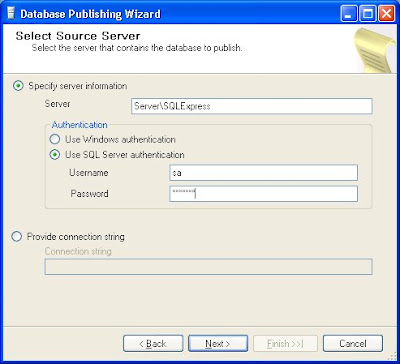
After an introductory screen, you will see this one. You need to enter the same credentials as you would with the SQL Server Management tool.
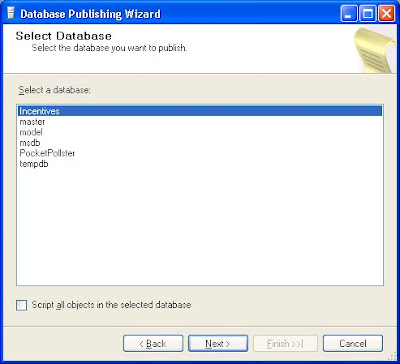
 You're then prompted to specify which DB you wish to upload (in full or a portion of). By selecting the checkbox at the bottom you will upload the entire DB in its entirety. Note: If you do so, make sure that the size of the DB won't exceed your hosting limits!
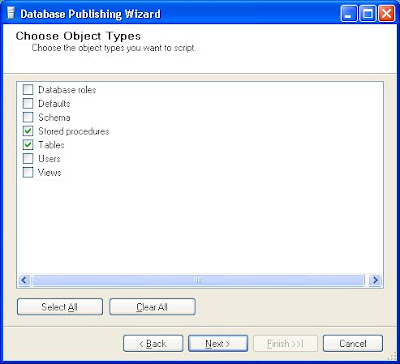
 If the aforementioned checkbox was not selected then you will be presented with this screen, which allows you to pick what types of objects you want to publish.
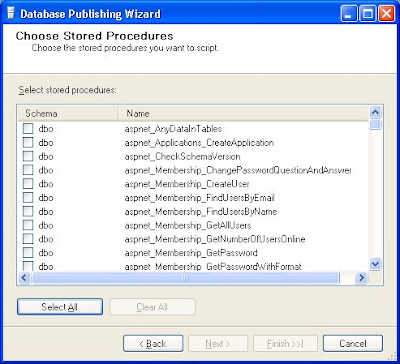
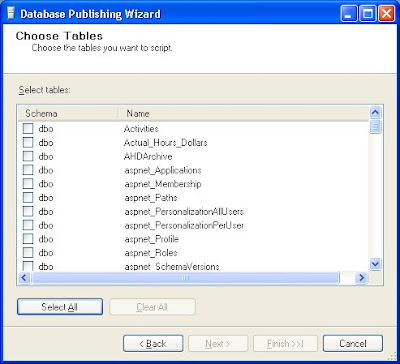
 Because of what I just selected, I was presented with the next two screens, letting me select the objects I wanted published. Note: For any Stored Procedure you select, it will automatically upload any Tables referred to within, plus their contents. Failure to notice this and you will start uploading huge tables which you never specified on the Tables screen!
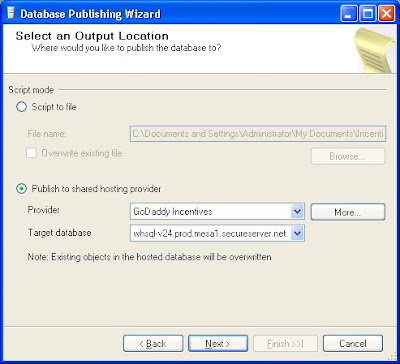
 Once you've selected what you want published, then you need to inform the tool where to publish it, including all of the necessary credentials. Much has to be entered via the "More..." button. If you're using GoDaddy like I am then finding the precise syntax for the "Target database" was exceptionally tricky. But you can find the info here:
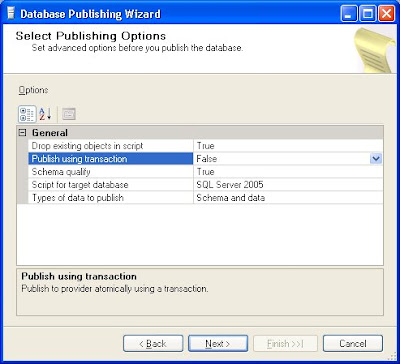
 There was a short delay before this next screen appeared. I assume that communication with the remote server was what caused the delay. You'll notice that "Publish using transaction" is set to False. I first tried it the other way but a strange error occurred, referring to a mysterious unknown user. I couldn't decipher it. Because Transaction mode was enabled, nothing got published. So I set it to False and though the error occurred again, at least it didn't retroactively remove all the objects it had just created in the DB.
 When you first hit 'Next' on the previous screen this next one immediately appears.
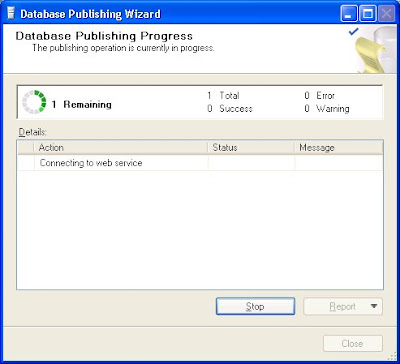 Eventually the contents within expand somewhat.
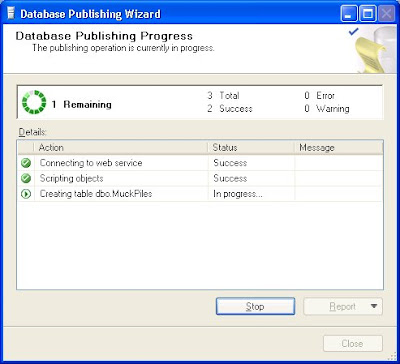 The time it takes is dependent on several factors, but the size of the DB you're publishing will play a large factor. In my case it took about 20 minutes. As long as it seems to be doing something, be patient!
The SQL Server Database Publishing Wizard is a free utility that greatly simplifies the process of publishing your DB to a remote server. It asks for a lot of information though, which can sometimes get confusing. I hope this serves as a general guide to help you get up & running with the tool. It goes without saying that the assorted info you see on the screenshots below is mine. You will have to alter all such data for your specific situation.
After an introductory screen, you will see this one. You need to enter the same credentials as you would with the SQL Server Management tool.
 You're then prompted to specify which DB you wish to upload (in full or a portion of). By selecting the checkbox at the bottom you will upload the entire DB in its entirety. Note: If you do so, make sure that the size of the DB won't exceed your hosting limits!
 If the aforementioned checkbox was not selected then you will be presented with this screen, which allows you to pick what types of objects you want to publish.
 Because of what I just selected, I was presented with the next two screens, letting me select the objects I wanted published. Note: For any Stored Procedure you select, it will automatically upload any Tables referred to within, plus their contents. Failure to notice this and you will start uploading huge tables which you never specified on the Tables screen!
 Once you've selected what you want published, then you need to inform the tool where to publish it, including all of the necessary credentials. Much has to be entered via the "More..." button. If you're using GoDaddy like I am then finding the precise syntax for the "Target database" was exceptionally tricky. But you can find the info here:
- Choose Databases -> SQL Server
- On the line specifying your DB, click on the Pencil icon on the right
- Click on Configuration
- You'll then see all the assorted DB connection info you need
 There was a short delay before this next screen appeared. I assume that communication with the remote server was what caused the delay. You'll notice that "Publish using transaction" is set to False. I first tried it the other way but a strange error occurred, referring to a mysterious unknown user. I couldn't decipher it. Because Transaction mode was enabled, nothing got published. So I set it to False and though the error occurred again, at least it didn't retroactively remove all the objects it had just created in the DB.
 When you first hit 'Next' on the previous screen this next one immediately appears.
 Eventually the contents within expand somewhat.
 The time it takes is dependent on several factors, but the size of the DB you're publishing will play a large factor. In my case it took about 20 minutes. As long as it seems to be doing something, be patient!
Monday, December 1, 2008
Customizing a Breakpoint in the VStudio IDE
If you're like me, then you frequently setup breakpoints throughout your code to assist you with debugging. Today I had a unique situation where I wanted the code to stop only when a variable acquired a specific value. I looked around the Visual Studio menus but couldn't see anything to help me. So I posted this on an ASP.Net forum. Sure enough, within a few hours a fellow responded, pointing out that one could right-click on a breakpoint and customize it in several different ways. I had absolutely no idea of this! Here are some screenshots:


Subscribe to:
Comments (Atom)


