I just read a pair of articles by Dave Ward over at his excellent Encosia site. This one focuses on the differences between pageLoad() and $(document).ready() and this one focuses on having a pageLoad() function in both a Content page and a Master page.
If you're not 100% familiar about when these functions fire (and don't fire) then I'd strongly recommend reading both articles.
Showing posts with label JavaScript. Show all posts
Showing posts with label JavaScript. Show all posts
Thursday, June 11, 2009

Thursday, May 28, 2009
Converting the ModalPopupExtender to ThickBox
As a follow-up to my two articles on using jQuery's ThickBox plugin instead of the AJAX Control Toolkit Modal Popup Extender, I thought it prudent to provide a checklist of what steps are needed, as I've even forgotten some myself at times!
Let me also say from the outset that not all dialog boxes can be converted over easily. To date I have not found a way to get rid of the Modal Popup Extender if the dialog box depends on server-side code for its operation. The basic problem is that if a postback has to occur then the ThickBox dialog box will disappear, at least temporarily, which is unacceptable. Perhaps there's a way around this but I have not yet discovered it. So make sure you have a good backup before you proceed with any conversion attempt!
There are several different ways to setup ThickBox in your project and use it in place of the Modal Popup Extender. I'm simply going to describe one approach that works well for me.
1. Reference jQuery and ThickBox within the Script Manager.

2. Configure how Thickbox references the loading animation GIF file. More here in Step 1.
3. Reference thickbox.css. You will likely want to customize this CSS file to suit your particular needs.

4. Update the path to macFFBgHack.png as described in Step 2 here.
5. Remove the entire ModalPopupExtender element in the ASPX file.
6. Change the asp:Panel element that the ModalPopupExtender referenced to a div element instead. Remember to modify the closing tag as well. In what is now the opening div element remove runat="server" and Enabled="false". Then add style="display:none" to this opening div element.
7. The section within the opening and closing div tags define the contents of the dialog box that you're going to display. You can leave them exactly as they were working with the ModalPopupExtender, albeit with one minor caveat:
Any Button controls you had will no longer function. The reason has something to do with the way ThickBox copies & utilizes the markup code. But there is a simple solution: Leave the server-side events as-is. Then add this client-side event handler definition to every Button control: OnClientClick="CloseModalDialog(this)"
8. Since ThickBox will likely be used by many web pages, it makes sense to create a common.js external Javascript file that is referenced by all of them. In practice I have the reference for it in the same ScriptManager definition shown above, though it was removed there for clarity.
In common.js add this CloseModalDialog function:

9. In the ThickBox documentation you'll learn that the "standard" way of initiating the display of a dialog box is via an <a href= reference. That's fine but all of my work to date involves initiating dialog boxes from server-side code. For example, this was previously done like this: ModalPopupExtender1.Show();
To accomplish the same thing with ThickBox I created a server-side method called ShowDialog and placed it in a class library called Common.cs which is referenced universally by all of the web pages in my project. Here is the code:

That's it! There are indeed several steps initially but once you've done it once then successive thickboxes are much quicker to implement.
Note: If you'd like a copy of any code I've referenced, just write me and I'll send it to you!
Important Note re Validation
When fields are displayed on a typical ASP.Net web page, Validation controls are often used to ensure that the necessary fields are complete, have correct data in them, etc. If there is something wrong then when the Submit button is pressed, some sort of visual indication explains to the user what needs to be fixed.
Unfortunately this doesn't work so well when the same fields are displayed in a ThickBox dialog box. Because the aforementioned CloseModalDialog function is called every time, a postback always occurs and dialog box is lost.
So to solve the problem, an intermediary function has to be called to check whether all of the validation tests were successful; if so then continue on and call CloseModalDialog, if not then end the function quietly. In the latter case, the dialog box stay as-is and the ASP.Net validation controls work as expected, showing the user where the problem(s) lie.
In terms of checking the validation tests, I was hopeful that this approach would work, but I couldn't duplicate the author's success. So I used jQuery to simply double-check the validation again. This is not ideal but as of this time I do not have a better solution.

Here are some examples of modal dialog boxes I've successfully implemented with ThickBox:
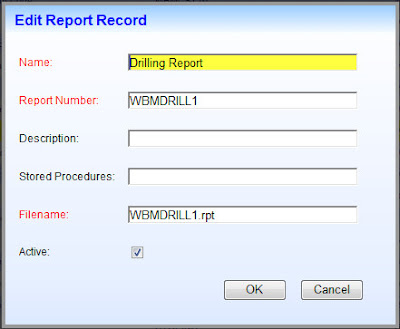
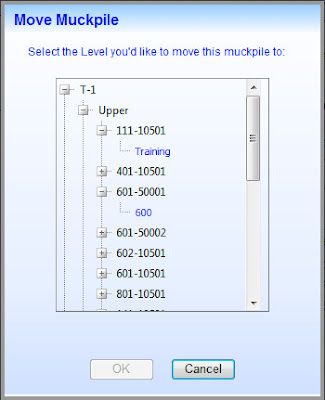
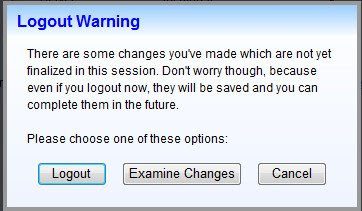
Let me also say from the outset that not all dialog boxes can be converted over easily. To date I have not found a way to get rid of the Modal Popup Extender if the dialog box depends on server-side code for its operation. The basic problem is that if a postback has to occur then the ThickBox dialog box will disappear, at least temporarily, which is unacceptable. Perhaps there's a way around this but I have not yet discovered it. So make sure you have a good backup before you proceed with any conversion attempt!
There are several different ways to setup ThickBox in your project and use it in place of the Modal Popup Extender. I'm simply going to describe one approach that works well for me.
1. Reference jQuery and ThickBox within the Script Manager.

2. Configure how Thickbox references the loading animation GIF file. More here in Step 1.
3. Reference thickbox.css. You will likely want to customize this CSS file to suit your particular needs.

4. Update the path to macFFBgHack.png as described in Step 2 here.
5. Remove the entire ModalPopupExtender element in the ASPX file.
6. Change the asp:Panel element that the ModalPopupExtender referenced to a div element instead. Remember to modify the closing tag as well. In what is now the opening div element remove runat="server" and Enabled="false". Then add style="display:none" to this opening div element.
7. The section within the opening and closing div tags define the contents of the dialog box that you're going to display. You can leave them exactly as they were working with the ModalPopupExtender, albeit with one minor caveat:
Any Button controls you had will no longer function. The reason has something to do with the way ThickBox copies & utilizes the markup code. But there is a simple solution: Leave the server-side events as-is. Then add this client-side event handler definition to every Button control: OnClientClick="CloseModalDialog(this)"
8. Since ThickBox will likely be used by many web pages, it makes sense to create a common.js external Javascript file that is referenced by all of them. In practice I have the reference for it in the same ScriptManager definition shown above, though it was removed there for clarity.
In common.js add this CloseModalDialog function:

9. In the ThickBox documentation you'll learn that the "standard" way of initiating the display of a dialog box is via an <a href= reference. That's fine but all of my work to date involves initiating dialog boxes from server-side code. For example, this was previously done like this: ModalPopupExtender1.Show();
To accomplish the same thing with ThickBox I created a server-side method called ShowDialog and placed it in a class library called Common.cs which is referenced universally by all of the web pages in my project. Here is the code:

That's it! There are indeed several steps initially but once you've done it once then successive thickboxes are much quicker to implement.
Note: If you'd like a copy of any code I've referenced, just write me and I'll send it to you!
Important Note re Validation
When fields are displayed on a typical ASP.Net web page, Validation controls are often used to ensure that the necessary fields are complete, have correct data in them, etc. If there is something wrong then when the Submit button is pressed, some sort of visual indication explains to the user what needs to be fixed.
Unfortunately this doesn't work so well when the same fields are displayed in a ThickBox dialog box. Because the aforementioned CloseModalDialog function is called every time, a postback always occurs and dialog box is lost.
So to solve the problem, an intermediary function has to be called to check whether all of the validation tests were successful; if so then continue on and call CloseModalDialog, if not then end the function quietly. In the latter case, the dialog box stay as-is and the ASP.Net validation controls work as expected, showing the user where the problem(s) lie.
In terms of checking the validation tests, I was hopeful that this approach would work, but I couldn't duplicate the author's success. So I used jQuery to simply double-check the validation again. This is not ideal but as of this time I do not have a better solution.

Here are some examples of modal dialog boxes I've successfully implemented with ThickBox:


Sunday, May 24, 2009
Client-Side Progress Indicator
Long ago I learned how to properly wire up the AJAX UpdateProgress control. This works perfectly to display a wait indicator while the AJAX UpdatePanel is performing a partial page postback. That's fine for server-side operations but what about on the client-side?
Lately I've been doing a lot more work on the client-side, in no small part due to my adoption of jQuery as a standard for all of my web programming. What once was always frustrating is now quite fun! As such, I'm in the process of doing the following with all of my Javascript code:

 Both treeviews have an "Expand All / Collapse All" button below them, providing a one-touch way for the user to quickly expand/collapse all the nodes of the treeview. This operation is done entirely with client-side code. Depending on the number of nodes, the delay time can be upwards of 5 seconds. While it's occurring, there was no wait indicator, so I decided to add one.
I thought I could just add the same jQuery code to the beginning & end of the function as I had successfully deployed to the AJAX Event Handler functions, namely:
$("#<%=UpdateProgress1.ClientID%>").css("display", "block");
$("#<%=UpdateProgress1.ClientID%>").css("display", "none");
I tried it and . . . nothing happened. There was no wait indicator whatsoever! After scratching my head for awhile, it occurred to me that the problem may lay with the web equivalent of the DoEvents() necessity that every WinForms developer is familiar with, namely that the UI needs to be given time to catch up. So I did a little research and found this old, but excellent article on MSDN. It confirmed that the Javascript setTimeout() function had to be used for a similar reason to why DoEvents() is needed with Windows programming.
So I moved the bulk of the code within my buttonExpandCollapse_Click function into one called ExpandCollapseNodes. And then I called the latter from the former as follows:
setTimeout(function() { ExpandCollapseNodes(button, hidVar, treeView, waitAnimID) }, 1);
It works beautifully! Note that just a 1 millisecond delay is all that's necessary to cause the wait indicator to display. The code to turn on the wait indicator is executed in the calling function and the code to turn off the display is the very last line of ExpandCollapseNodes.
I'd more than happy to provide a more complete set of the code if it would help anyone. Just ask!
Lately I've been doing a lot more work on the client-side, in no small part due to my adoption of jQuery as a standard for all of my web programming. What once was always frustrating is now quite fun! As such, I'm in the process of doing the following with all of my Javascript code:
- Converting as much as possible to jQuery.
- Streamlining everything I can.
- Turning custom code into generic, reusable code.
- Moving all of the reusable code to common external Javascript files.
- One for Roles/Users
- The other for something proprietary called "Contract Rights"

 Both treeviews have an "Expand All / Collapse All" button below them, providing a one-touch way for the user to quickly expand/collapse all the nodes of the treeview. This operation is done entirely with client-side code. Depending on the number of nodes, the delay time can be upwards of 5 seconds. While it's occurring, there was no wait indicator, so I decided to add one.
I thought I could just add the same jQuery code to the beginning & end of the function as I had successfully deployed to the AJAX Event Handler functions, namely:
$("#<%=UpdateProgress1.ClientID%>").css("display", "block");
$("#<%=UpdateProgress1.ClientID%>").css("display", "none");
I tried it and . . . nothing happened. There was no wait indicator whatsoever! After scratching my head for awhile, it occurred to me that the problem may lay with the web equivalent of the DoEvents() necessity that every WinForms developer is familiar with, namely that the UI needs to be given time to catch up. So I did a little research and found this old, but excellent article on MSDN. It confirmed that the Javascript setTimeout() function had to be used for a similar reason to why DoEvents() is needed with Windows programming.
So I moved the bulk of the code within my buttonExpandCollapse_Click function into one called ExpandCollapseNodes. And then I called the latter from the former as follows:
setTimeout(function() { ExpandCollapseNodes(button, hidVar, treeView, waitAnimID) }, 1);
It works beautifully! Note that just a 1 millisecond delay is all that's necessary to cause the wait indicator to display. The code to turn on the wait indicator is executed in the calling function and the code to turn off the display is the very last line of ExpandCollapseNodes.
I'd more than happy to provide a more complete set of the code if it would help anyone. Just ask!
Monday, May 18, 2009
Passing Objects to Javascript Functions
Shifting from WinForms programming to ASP.Net web development was not an easy transition for me. One of the most difficult things was dealing with Javascript for client-side work. The language is poorly typed and way too freeform for my taste. Hence, much of the example code I've seen often resembles a plate of spaghetti.
Now that I've adopted jQuery into my everyday work, building client-side code is a LOT easier but there are still direct challenges with Javascript that have to be overcome. Such a challenge presented itself to me recently.
As might be expected, I've found that many of the Javascript functions I build have applicability on many web pages. So naturally one wants to build them generically and move them to shared external Javascript files. To do this, parameters often have to be passed to a function. If the function is referenced by the setTimeout or setInterval methods and one or more of these parameters is an object rather than a simple value then it gets a little tricky.
Through a lot of trial & error, and with the help of developers on ASP.Net, I figured out how to do this. The key is to pass the IDs of the objects, as the objects themselves cannot be passed. Here's an example of passing a reference to a Telerik RadTreeView and a Hidden Variable:

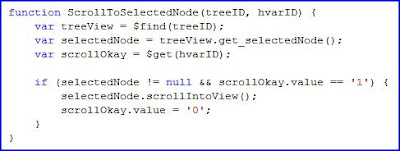 As you can see in the first set of code, you must pass the ClientID of ASP.Net controls to the Javascript function. Then in the function itself you need to retrieve the object with methods like $find and $get.
Now that I've adopted jQuery into my everyday work, building client-side code is a LOT easier but there are still direct challenges with Javascript that have to be overcome. Such a challenge presented itself to me recently.
As might be expected, I've found that many of the Javascript functions I build have applicability on many web pages. So naturally one wants to build them generically and move them to shared external Javascript files. To do this, parameters often have to be passed to a function. If the function is referenced by the setTimeout or setInterval methods and one or more of these parameters is an object rather than a simple value then it gets a little tricky.
Through a lot of trial & error, and with the help of developers on ASP.Net, I figured out how to do this. The key is to pass the IDs of the objects, as the objects themselves cannot be passed. Here's an example of passing a reference to a Telerik RadTreeView and a Hidden Variable:

 As you can see in the first set of code, you must pass the ClientID of ASP.Net controls to the Javascript function. Then in the function itself you need to retrieve the object with methods like $find and $get.
Saturday, May 9, 2009
Using ThickBox with Server-side Buttons
For a while now I've been looking for a jQuery equivalent to the Modal Popup Extender. Two key requirements were:
string script = "$(document).ready(function() {tb_show('Sample Title', '#TB_inline?height=120&width=300&inlineId=sampleContent', null);});";
ScriptManager.RegisterStartupScript(Page, typeof(Page), "", script, true);
But the second requirement proved much more difficult. It seemed that no matter which open source dialog box I tried, it would just not allow server-side events to be fired.
Eventually though, through the help of ASP.Net user PNasser, I found a solution! The key was to add a simple Javascript function call to each ASP.Net button in the dialog box:
Which then calls this:
function doPostBack(element) {
tb_remove();
setTimeout('__doPostBack(\'' + element.name + '\',\'\')', 500);
}
That's it! What's happening is that first the call is made to the ThickBox to remove itself. This is precisely the same function that's called when you click on "close" in its title bar or press "Esc".

Then a postback is explicitly called via the __doPostBack function. But it isn't called immediately. Instead, it's executed after a 500ms delay. I don't precisely know the reason why the delay is necessary but am guessing that it provides the ThickBox enough time to fade out and dispose of itself. I experimented with the delay time and found on my computer that as low as 300ms worked. Less than that though and a full postback occurred, which is not the effect one wants on an AJAX-enabled page!
I've created a little demonstration project which you can download here.
- It had to be able to be called from server-side code.
- The dialog box itself had to have ASP.Net buttons.
string script = "$(document).ready(function() {tb_show('Sample Title', '#TB_inline?height=120&width=300&inlineId=sampleContent', null);});";
ScriptManager.RegisterStartupScript(Page, typeof(Page), "", script, true);
But the second requirement proved much more difficult. It seemed that no matter which open source dialog box I tried, it would just not allow server-side events to be fired.
Eventually though, through the help of ASP.Net user PNasser, I found a solution! The key was to add a simple Javascript function call to each ASP.Net button in the dialog box:
OnClientClick="doPostBack(this);"
Which then calls this:
function doPostBack(element) {
tb_remove();
setTimeout('__doPostBack(\'' + element.name + '\',\'\')', 500);
}
That's it! What's happening is that first the call is made to the ThickBox to remove itself. This is precisely the same function that's called when you click on "close" in its title bar or press "Esc".

Then a postback is explicitly called via the __doPostBack function. But it isn't called immediately. Instead, it's executed after a 500ms delay. I don't precisely know the reason why the delay is necessary but am guessing that it provides the ThickBox enough time to fade out and dispose of itself. I experimented with the delay time and found on my computer that as low as 300ms worked. Less than that though and a full postback occurred, which is not the effect one wants on an AJAX-enabled page!
I've created a little demonstration project which you can download here.
Friday, May 8, 2009
Calling ThickBox From Server-side Code
I'm actively engaged in replacing as many of the AJAX Control Toolkit components as I can with jQuery Plugin equivalents.
In terms of replacing the Modal Popup Extender, I did a lot of research and have decided to go with ThickBox. It's simple to use, has been around for some time, and appears to be fairly flexible. For ASP.Net developers there are several good articles about using it. This was one of the best.
Everything I read referred to wiring up a ThickBox to either a hyperlink or button. That's fine but I wanted to see if I could access it programatically, so that I could call it from server-side code, just like I do with the Modal Popup Extender.
So I searched through the ThickBox source code and found this:
And here's how I implemented it with C# code:
string script = "$(document).ready(function() {tb_show('Sample Title', '#TB_inline?height=200
&width=400&inlineId=sampleContent', null);});";
ScriptManager.RegisterStartupScript(Page, typeof(Page), "", script, true);

Incidentally, one thing I could not achieve was implementing buttons that called server-side code. When I tested them, the server-side event was not fired. Perhaps someone will figure out a way to do this and leave a comment on here about that.
In terms of replacing the Modal Popup Extender, I did a lot of research and have decided to go with ThickBox. It's simple to use, has been around for some time, and appears to be fairly flexible. For ASP.Net developers there are several good articles about using it. This was one of the best.
Everything I read referred to wiring up a ThickBox to either a hyperlink or button. That's fine but I wanted to see if I could access it programatically, so that I could call it from server-side code, just like I do with the Modal Popup Extender.
So I searched through the ThickBox source code and found this:
function tb_show(caption, url, imageGroup) {//function called when the user clicks on a thickbox link
And here's how I implemented it with C# code:
string script = "$(document).ready(function() {tb_show('Sample Title', '#TB_inline?height=200
&width=400&inlineId=sampleContent', null);});";
ScriptManager.RegisterStartupScript(Page, typeof(Page), "", script, true);

Incidentally, one thing I could not achieve was implementing buttons that called server-side code. When I tested them, the server-side event was not fired. Perhaps someone will figure out a way to do this and leave a comment on here about that.
Thursday, May 7, 2009
IsPostBack for Client-Side Code
In client-side code, I needed to determine whether the pageLoad function was being run the first time the page was loaded or on a subsequent postback. Searching around, many said there was no such function. But then I came across one posting which illustrated that there indeed is ... at least to detect partial postbacks:
function pageLoad(sender, e)
{
if (!e.get_isPartialLoad())
{

}
}
Saturday, May 2, 2009
How to Get jQuery Intellisense Working with VS2008
Intellisense provides great assistance with anyone starting out with a new programming language. Learning jQuery from scratch, I've found this very much to be the case. Oh sure, one can develop in any language without such assistance. In fact, I have fond memories of teaching myself AutoLISP in the "ancient" year of 1990. Back then there was no Windows and the main IDE was the DOS equivalent of Notepad!
Anyhow, things have changed quite a bit since then and I immediately knew it would be great to have Intelisense working for jQuery! There are several steps involved though but through much trial & error I've finally got it working properly. Hopefully others will benefit from my efforts.
How Do You Know if jQuery Intellisense is Working?
Simply go to a location where you'd normally enter Javascript code and type a dollar sign ("$"). A pop-up menu will appear. What it displays gives you an immediate indication of whether jQuery Intellisense is functioning. Here's a development environment where it's not working:
 And here's one where it is working:
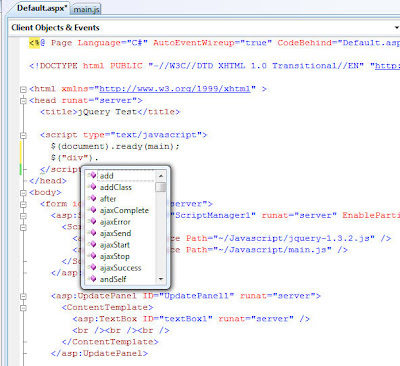
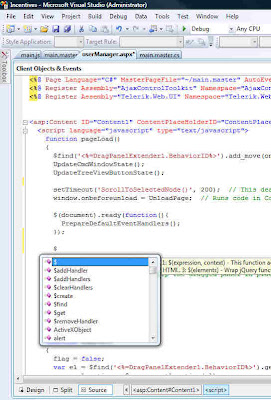 In the second screenshot, notice that the first item is a single "$". This is positive! If you wanted to test it further, you could type a little more, like: $("div").
Something akin to the following should then appear in the pop-up menu:
 Important Note: Every time I first load a project/solution into VS2008, the jQuery Intellisense does NOT work on the initial try!! I have to clear that menu, wait a few seconds and then try again. From then on it works perfectly, showing the single "$" as the first item in the pop-up menu.
Getting jQuery Intellisense Up & Running
Referencing the jQuery Library and the jQuery Intellisense File
I'm a big believer in:
 Notice that there's a "Javascript" folder, which contains the jQuery Intellisense file, the jQuery library file, and an external Javascript file. Based on this file arrangement, either of the following approaches will work with an ASP.Net AJAX application:
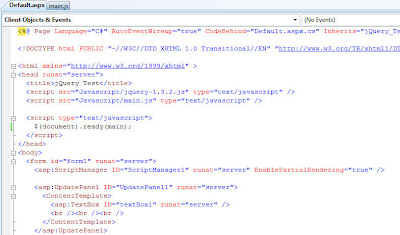
 You might be wondering why there's no reference to the jQuery Intellisense file? Well, as long as it follows the filename syntax shown in Step #4 above then it is automatically detected and loaded.
Accessing jQuery Intellisense in an External Javascript File
As mentioned previously, I like to place as much Javascript (and jQuery) code into external Javascript files (those ending in ".js") as is practical. If you use the same approach then you will face a disappointment if you're expecting Intellisense to work properly in such a file:
 No jQuery Intellisense there!
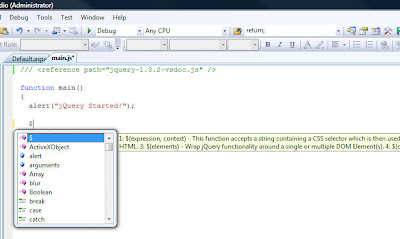
The solution is very simple though. Just add a reference like this to the top of the file:
Then the Intellisense you enjoy in ASPX files will also work in external Javascript files too! Here's an example:
Final Caveat
A little while ago I presented a way to programatically load jQuery entirely from server-side code. It does work and is powerful because a common server-side method could be built and then used in all of your projects. But jQuery Intellisense will not work using that approach; at least not with VS2008. Perhaps that will change in VS2010!
Anyhow, things have changed quite a bit since then and I immediately knew it would be great to have Intelisense working for jQuery! There are several steps involved though but through much trial & error I've finally got it working properly. Hopefully others will benefit from my efforts.
How Do You Know if jQuery Intellisense is Working?
Simply go to a location where you'd normally enter Javascript code and type a dollar sign ("$"). A pop-up menu will appear. What it displays gives you an immediate indication of whether jQuery Intellisense is functioning. Here's a development environment where it's not working:
 And here's one where it is working:
 In the second screenshot, notice that the first item is a single "$". This is positive! If you wanted to test it further, you could type a little more, like: $("div").
Something akin to the following should then appear in the pop-up menu:
 Important Note: Every time I first load a project/solution into VS2008, the jQuery Intellisense does NOT work on the initial try!! I have to clear that menu, wait a few seconds and then try again. From then on it works perfectly, showing the single "$" as the first item in the pop-up menu.
Getting jQuery Intellisense Up & Running
- Ensure that VS2008 SP1 is installed. (Further info)
- Ensure that Hotfix KB958502 is installed. (Further info)
- Install the jQuery library into your project. It'll have a filename like "jquery-1.3.2.js".
- Install the jQuery Intellisense file into your project. It may very well have a filename like "jquery-1.3.2-vsdoc2.js" but must be renamed to be identical to the jQuery library name, plus "-vsdoc". Thus in this example, it must be renamed to "jquery-1.3.2-vsdoc.js".
- Provide a reference to the jQuery library. There are generally two ways to do this, both of which are described below.
- In external Javascript files a direct reference to the jQuery Intellisense file must be made. More details are provided below.
Referencing the jQuery Library and the jQuery Intellisense File
I'm a big believer in:
- Organizing a project's files into as many sub-folders as makes sense.
- Separating programming code from markup code as much as possible.
 Notice that there's a "Javascript" folder, which contains the jQuery Intellisense file, the jQuery library file, and an external Javascript file. Based on this file arrangement, either of the following approaches will work with an ASP.Net AJAX application:
 You might be wondering why there's no reference to the jQuery Intellisense file? Well, as long as it follows the filename syntax shown in Step #4 above then it is automatically detected and loaded.
Accessing jQuery Intellisense in an External Javascript File
As mentioned previously, I like to place as much Javascript (and jQuery) code into external Javascript files (those ending in ".js") as is practical. If you use the same approach then you will face a disappointment if you're expecting Intellisense to work properly in such a file:
 No jQuery Intellisense there!
The solution is very simple though. Just add a reference like this to the top of the file:
/// <reference path="jquery-1.3.2-vsdoc.js" />
Then the Intellisense you enjoy in ASPX files will also work in external Javascript files too! Here's an example:

Final Caveat
A little while ago I presented a way to programatically load jQuery entirely from server-side code. It does work and is powerful because a common server-side method could be built and then used in all of your projects. But jQuery Intellisense will not work using that approach; at least not with VS2008. Perhaps that will change in VS2010!
Friday, May 1, 2009
Setting Default Focus to the Correct TextBox in a Login Control
If you're using the ASP.Net Login control then your login page may look something like this:

The username, by the way, was automatically placed into the textbox via a cookie. And though it's not immediately visible in the above screenshot, the cursor is in the Password textbox via the server-side SetFocus() method. The user, upon being presented with this screen, can then just type their password and press Enter.
Now look at this next screenshot:
 Not only is the cursor in the Password textbox like before, but the background color of the textbox is automatically highlighted to provide another visual cue. This highlighting was done globally with jQuery with just a few lines of code.
All good so far. But I discovered that the jQuery auto-highlighting did not work when a page was first loaded. I still do not know why but suspect that the server-side SetFocus() method does not raise the client-side 'focus' event.
Solving the problem meant moving the code the server to the client. Here's what worked for me:
<script language="javascript" type="text/javascript">
function pageLoad()
{
$(document).ready(function(){
PrepareDefaultEventHandlers();
var textBoxUserName = $('#<%= Login1.FindControl("UserName").ClientID %>')[0];
if (textBoxUserName.value == "")
textBoxUserName.focus();
else
{
var textBoxPassword = $('#<%= Login1.FindControl("Password").ClientID %>')[0];
textBoxPassword.focus();
}
});
}
</script>
A big thanks to Dave Ward at Encosia for his invaluable help with this!
The username, by the way, was automatically placed into the textbox via a cookie. And though it's not immediately visible in the above screenshot, the cursor is in the Password textbox via the server-side SetFocus() method. The user, upon being presented with this screen, can then just type their password and press Enter.
Now look at this next screenshot:
 Not only is the cursor in the Password textbox like before, but the background color of the textbox is automatically highlighted to provide another visual cue. This highlighting was done globally with jQuery with just a few lines of code.
All good so far. But I discovered that the jQuery auto-highlighting did not work when a page was first loaded. I still do not know why but suspect that the server-side SetFocus() method does not raise the client-side 'focus' event.
Solving the problem meant moving the code the server to the client. Here's what worked for me:
<script language="javascript" type="text/javascript">
function pageLoad()
{
$(document).ready(function(){
PrepareDefaultEventHandlers();
var textBoxUserName = $('#<%= Login1.FindControl("UserName").ClientID %>')[0];
if (textBoxUserName.value == "")
textBoxUserName.focus();
else
{
var textBoxPassword = $('#<%= Login1.FindControl("Password").ClientID %>')[0];
textBoxPassword.focus();
}
});
}
</script>
A big thanks to Dave Ward at Encosia for his invaluable help with this!
Friday, April 24, 2009
2 Ways to Load jQuery from an ASP.Net Master Page
If you're getting started with using jQuery in ASP.Net, you'll probably come across a situation where you would like to load it from a Master Page so that it's available globally for all Content Pages. When you do so you'll find that you get assorted errors for different reasons.
After reading many articles and much trial & error I have determined two different approaches to get it working. Note: My preference is to separate all code from the markup as much as possible. So directly in the root of all my projects is a folder called "Javascript". Inside it I always place [at least] these 3 files:
Approach #1: Entirely from the Markup Page
<head runat="server">
<title></title>
<asp:ContentPlaceHolder ID="placeHolder1" runat="server">
<script src="<%= Page.ResolveUrl("~/JavaScript/jquery-1.3.2.js") %>" language="javascript" type="text/javascript"></script>
</asp:ContentPlaceHolder>
<asp:ContentPlaceHolder ID="ContentPlaceHolder1" runat="server">
<script src="<%= Page.ResolveUrl("~/JavaScript/jquery-vsdoc.js") %>" language="javascript" type="text/javascript"></script>
</asp:ContentPlaceHolder>
<asp:ContentPlaceHolder ID="ContentPlaceHolder2" runat="server">
<script src="<%= Page.ResolveUrl("~/JavaScript/main.js") %>" language="javascript" type="text/javascript"></script>
</asp:ContentPlaceHolder>
</head>
<body onload="$(document).ready(main)">
Approach #2: Entirely from Server-side Code
protected void Page_Load(object sender, EventArgs e)
{
AddScript(Page.ResolveUrl("~/JavaScript/jquery-1.3.2.js"));
AddScript(Page.ResolveUrl("~/JavaScript/jquery-vsdoc.js"));
AddScript(Page.ResolveUrl("~/JavaScript/main.js"));
string jScript = "$(document).ready(main);";
ScriptManager.RegisterStartupScript(Page, Page.GetType(),
Guid.NewGuid().ToString(), jScript, true);
}
private void AddScript(string src)
{
HtmlGenericControl genCtrl = new HtmlGenericControl();
genCtrl.TagName = "script";
genCtrl.Attributes.Add("type", "text/javascript");
genCtrl.Attributes.Add("language", "javascript");
genCtrl.Attributes.Add("src", src);
Page.Header.Controls.Add(genCtrl);
}
I hope this helps others! Please be aware that most everything above applies generically to all Javascript code, not just jQuery.
After reading many articles and much trial & error I have determined two different approaches to get it working. Note: My preference is to separate all code from the markup as much as possible. So directly in the root of all my projects is a folder called "Javascript". Inside it I always place [at least] these 3 files:
- jquery-1.3.2.js
- jquery-vsdoc.js
- main.js
Approach #1: Entirely from the Markup Page
<head runat="server">
<title></title>
<asp:ContentPlaceHolder ID="placeHolder1" runat="server">
<script src="<%= Page.ResolveUrl("~/JavaScript/jquery-1.3.2.js") %>" language="javascript" type="text/javascript"></script>
</asp:ContentPlaceHolder>
<asp:ContentPlaceHolder ID="ContentPlaceHolder1" runat="server">
<script src="<%= Page.ResolveUrl("~/JavaScript/jquery-vsdoc.js") %>" language="javascript" type="text/javascript"></script>
</asp:ContentPlaceHolder>
<asp:ContentPlaceHolder ID="ContentPlaceHolder2" runat="server">
<script src="<%= Page.ResolveUrl("~/JavaScript/main.js") %>" language="javascript" type="text/javascript"></script>
</asp:ContentPlaceHolder>
</head>
<body onload="$(document).ready(main)">
Approach #2: Entirely from Server-side Code
protected void Page_Load(object sender, EventArgs e)
{
AddScript(Page.ResolveUrl("~/JavaScript/jquery-1.3.2.js"));
AddScript(Page.ResolveUrl("~/JavaScript/jquery-vsdoc.js"));
AddScript(Page.ResolveUrl("~/JavaScript/main.js"));
string jScript = "$(document).ready(main);";
ScriptManager.RegisterStartupScript(Page, Page.GetType(),
Guid.NewGuid().ToString(), jScript, true);
}
private void AddScript(string src)
{
HtmlGenericControl genCtrl = new HtmlGenericControl();
genCtrl.TagName = "script";
genCtrl.Attributes.Add("type", "text/javascript");
genCtrl.Attributes.Add("language", "javascript");
genCtrl.Attributes.Add("src", src);
Page.Header.Controls.Add(genCtrl);
}
I hope this helps others! Please be aware that most everything above applies generically to all Javascript code, not just jQuery.
Tuesday, April 7, 2009
jQuery
 Last night I attended a great talk about jQuery given by Rod Paddock of Dashpoint Software. He was up from Austin, Texas and was a very entertaining speaker. Here's a summary of his talk.
This was part of the monthly speaker series organized by the .netBC Users Group. This time though it wasn't held at a BCIT facility but instead was at Microsoft's Richmond office. It's nowhere near as fancy as their Redmond head office but still was very nice.
I had never heard of jQuery prior to this talk. It's an open source Javascript library that abstracts software development to a higher level, thus making things easier and MUCH more straightforward. Quite frankly, Javascript development has been the bane of my life ever since I started building websites. I understand the basics but the freeform nature of it makes it very unwieldly. I've tried to learn more by looking at examples but there is so much spaghetti code out there that is purely dreadful. Oh sure, it might work, but how any other developer could take over such code would almost surely be a nightmare. This is something that a lot of younger developers don't think about much but is extremely important.
Another Javascript library that I have used extensively for some time is the AJAX Control Toolkit. It has served me well but it's clear now that Microsoft is going to be adopting jQuery big time so I'm committed to switching over all of my existing codebase to jQuery. It'll be a lot of work, but will be well worth it for the longterm!
Friday, January 16, 2009
How to Expand/Collapse a TreeView with Javascript
I encountered a task today that I thought would be extremely simple: Add a button that would expand/collapse a treeview in a toggle-like manner:

But after I implemented my code, it kept getting stuck on "Expand All". The reason turned out to be that the button was forcing a partial postback in the AJAX Update Panel, even though I had no server-side event defined.
The solution was to modify the client-side click definition a little:
If you don't add the "return false;" addendum then a postback occurs.
Here by the way is the Javascript code that this button calls:
var treeExpanded;
function buttonExpandCollapse_Click()
{
if (treeExpanded == null)
treeExpanded = false;
var button = $get('<%= buttonExpandCollapse.ClientID %>');
var treeView = <%= treeViewMain.ClientID %>;
// TreeView expand/collapse code here; varies depending on the type of treeview control
if (treeExpanded)
button.value = 'Expand All';
else
button.value = 'Collapse All';
treeExpanded = !treeExpanded;
}

The solution was to modify the client-side click definition a little:
If you don't add the "return false;" addendum then a postback occurs.
Here by the way is the Javascript code that this button calls:
var treeExpanded;
function buttonExpandCollapse_Click()
{
if (treeExpanded == null)
treeExpanded = false;
var button = $get('<%= buttonExpandCollapse.ClientID %>');
var treeView = <%= treeViewMain.ClientID %>;
// TreeView expand/collapse code here; varies depending on the type of treeview control
if (treeExpanded)
button.value = 'Expand All';
else
button.value = 'Collapse All';
treeExpanded = !treeExpanded;
}
Monday, November 3, 2008
Using an External Javascript File with ASP.Net
I came across a very strange problem and a solution that I think others will benefit from.
To make things more modular I've started placing all commonly used Javascript functions into an external ".js" file. When using AJAX, the only thing you have to do to define each such file in the ScriptManager:
 But here's the weird thing: Say you have a Javascript function called "abc" setup and working. If you then decide to rename it to something else (perhaps something more descriptive) you'll discover that you get an error, even when you've rebuilt your solution.
The reason is because these Javascript functions are cached in your browser, not in Visual Studio. So you need to clear your cache, which is often referred to as deleting all temporary files. Once you do that then your app will be able to find the newly named Javascript function.
To make things more modular I've started placing all commonly used Javascript functions into an external ".js" file. When using AJAX, the only thing you have to do to define each such file in the ScriptManager:
 But here's the weird thing: Say you have a Javascript function called "abc" setup and working. If you then decide to rename it to something else (perhaps something more descriptive) you'll discover that you get an error, even when you've rebuilt your solution.
The reason is because these Javascript functions are cached in your browser, not in Visual Studio. So you need to clear your cache, which is often referred to as deleting all temporary files. Once you do that then your app will be able to find the newly named Javascript function.
Monday, October 27, 2008
OnClientClick and Postback
I created a small grid that looks like this:
 Intuitively, it makes no sense for the "Discard" button at the bottom to be enabled if none of the checkboxes above it are selected.
After building the JavaScript to handle this logic, I thought I had done everything correctly. But I noticed that everytime I pressed the "Toggle" LinkButton, a postback was performed. Considering that I had no server-side code wired up for this control, I was most confused. I did a little research and discovered that when using the OnClientClick property, you need to explicitly return false or a postback will occur.

 Intuitively, it makes no sense for the "Discard" button at the bottom to be enabled if none of the checkboxes above it are selected.
After building the JavaScript to handle this logic, I thought I had done everything correctly. But I noticed that everytime I pressed the "Toggle" LinkButton, a postback was performed. Considering that I had no server-side code wired up for this control, I was most confused. I did a little research and discovered that when using the OnClientClick property, you need to explicitly return false or a postback will occur.

Wednesday, May 21, 2008
Integrating FancyZoom into an ASP.Net Website
I've long been searching for an easy, cool way to display full-sized images when one clicks on a thumbnail image. Being an ASP.Net AJAX developer, this isn't always as simple as one would expect, as things sometimes just don't work in this environment whereas they work fine in pure HTML. I'm not a JavaScript guru and so don't find it appealing to have to hack into someone else's code to get it work properly in the ASP.Net environment.
I'd previously tried "LightWindow" and "Yahoo SpryEffects" but just couldn't get them working properly. But my luck changed today! This morning a friend sent me a link to this page. The art project it describes is hilarious but what also caught my attention was the cool way the images were being zoomed when you clicked on them. So I viewed the source code and discovered something called "FancyZoom.js". A quick Google search lead me to FancyZoom.com
Lo and behold, a fellow in nearby Portland, Oregon had built this really neat JavaScript tool. But would it work in ASP.Net?
As I always do nowadays, I start simple. So I created a standalone page to try it out. He recommends installing the two folders, "images-global" and "js-global", in the root folder. I prefer placing all such 3rd Party code in a separate "JavaScript" folder. Doing so, I had to slightly alter the script links. But other than that, everything worked precisely as his instructions laid out:
<%@ Page Language="C#" AutoEventWireup="true" CodeBehind="Test.aspx.cs" Inherits="Website.Test" %>
<!DOCTYPE html PUBLIC "-//W3C//DTD XHTML 1.0 Transitional//EN" "http://www.w3.org/TR/xhtml1/DTD/xhtml1-transitional.dtd">
<html xmlns="http://www.w3.org/1999/xhtml" >
<head runat="server">
<title>Untitled Page</title>
<script src="/JavaScript/js-global/FancyZoom.js" type="text/javascript"></script>
<script src="/JavaScript/js-global/FancyZoomHTML.js" type="text/javascript"></script>
</head>
<body onload="setupZoom()">
<form id="form1" runat="server">
<div>
<a href="Images/sunset.jpg"><img src="Images/sunset_thumb.jpg" alt="" /></a>
</div>
</form>
</body>
</html>
I ran the project and ... it worked! Rarely has that ever happened with JavaScript code I've found on the Internet! This first test was in IE7. I then tested it in Firefox 2.0 and the results were equally great.
The next test was to get it working when a Master Page was involved, which is most often the case with my ASP.Net projects. I added the two "script" lines and the modified "body" line to my "main.Master" file. I thought I might have to add a ScriptManagerProxy control to my content page but I did not. It just worked right away!
But there was one last thing to try. I have a commercial website in development which you can check out here. Most of the images on this site are just static ones that never need to be enlarged. And because the images are not hyperlinked, they won't be affected by FancyZoom. So I could have just activate FancyZoom in the Master Page as before and all would have worked fine. But I wanted to see if I could restrict the scope of the JavaScript to just the one page where I need the zoom facility. That page can be found here.
Getting FancyZoom working here was a little more tricky. At the top of the page I added this:
<%@ Page Language="C#" MasterPageFile="~/main.master" AutoEventWireup="true" CodeFile="screensPPC.aspx.cs" Inherits="screensPPC" %>
<%@ Register Assembly="AjaxControlToolkit" Namespace="AjaxControlToolkit" TagPrefix="cc1" %>
<asp:Content ID="Content1" ContentPlaceHolderID="ContentPlaceHolder1" Runat="Server">
<asp:ScriptManagerProxy ID="ScriptManagerProxy1" runat="server">
<Scripts>
<asp:ScriptReference Path="../JavaScript/js-global/FancyZoom.js" />
<asp:ScriptReference Path="../JavaScript/js-global/FancyZoomHTML.js" />
</Scripts>
</asp:ScriptManagerProxy>
But where to activate the script? Just below the above code I placed this:
<script type="text/javascript">
setupZoom();
</script>
But it didn't work. I'm not 100% sure why but I think it's because the setupZoom code is being executed before the actual images on the client web page are rendered. So I moved the code to right near the very bottom, as follows:
<script type="text/javascript">
setupZoom();
</script>
</asp:Content>
And ... it worked! By the way, in using FancyZoom I replaced all of this:
<asp:imagebutton id="scrnShot1" runat="server" imageurl="~/Images/Screenshots/desktop1_t.jpg" width="200"></asp:imagebutton></span> <span style="font-family:courier new;"> onmouseover="this.style.border='2px solid blue';" onmouseout="this.style.border='2px solid white';"</span> <span style="font-family:courier new;"> /></span> <span style="font-family:courier new;"> <cc1:modalpopupextender id="modalPopup1" targetcontrolid="scrnShot1" popupcontrolid="panelModal1" backgroundcssclass="modalBackground"></cc1:modalpopupextender></span> <span style="font-family:courier new;"> OkControlID="modalCloseButton1" DropShadow="false" runat="server" />
With just this:
<a href="../Images/Screenshots/desktop1.jpg"><img src="../Images/Screenshots/desktop1_t.jpg" alt="" width="185px" /></a>
Much, much cleaner code!
In summary, I FancyZoom works perfectly in the 3 most likely ASP.Net scenarios. If you need similar functionality in your website then I highly recommend this product!

I'd previously tried "LightWindow" and "Yahoo SpryEffects" but just couldn't get them working properly. But my luck changed today! This morning a friend sent me a link to this page. The art project it describes is hilarious but what also caught my attention was the cool way the images were being zoomed when you clicked on them. So I viewed the source code and discovered something called "FancyZoom.js". A quick Google search lead me to FancyZoom.com
Lo and behold, a fellow in nearby Portland, Oregon had built this really neat JavaScript tool. But would it work in ASP.Net?
As I always do nowadays, I start simple. So I created a standalone page to try it out. He recommends installing the two folders, "images-global" and "js-global", in the root folder. I prefer placing all such 3rd Party code in a separate "JavaScript" folder. Doing so, I had to slightly alter the script links. But other than that, everything worked precisely as his instructions laid out:
<%@ Page Language="C#" AutoEventWireup="true" CodeBehind="Test.aspx.cs" Inherits="Website.Test" %>
<!DOCTYPE html PUBLIC "-//W3C//DTD XHTML 1.0 Transitional//EN" "http://www.w3.org/TR/xhtml1/DTD/xhtml1-transitional.dtd">
<html xmlns="http://www.w3.org/1999/xhtml" >
<head runat="server">
<title>Untitled Page</title>
<script src="/JavaScript/js-global/FancyZoom.js" type="text/javascript"></script>
<script src="/JavaScript/js-global/FancyZoomHTML.js" type="text/javascript"></script>
</head>
<body onload="setupZoom()">
<form id="form1" runat="server">
<div>
<a href="Images/sunset.jpg"><img src="Images/sunset_thumb.jpg" alt="" /></a>
</div>
</form>
</body>
</html>
I ran the project and ... it worked! Rarely has that ever happened with JavaScript code I've found on the Internet! This first test was in IE7. I then tested it in Firefox 2.0 and the results were equally great.
The next test was to get it working when a Master Page was involved, which is most often the case with my ASP.Net projects. I added the two "script" lines and the modified "body" line to my "main.Master" file. I thought I might have to add a ScriptManagerProxy control to my content page but I did not. It just worked right away!
But there was one last thing to try. I have a commercial website in development which you can check out here. Most of the images on this site are just static ones that never need to be enlarged. And because the images are not hyperlinked, they won't be affected by FancyZoom. So I could have just activate FancyZoom in the Master Page as before and all would have worked fine. But I wanted to see if I could restrict the scope of the JavaScript to just the one page where I need the zoom facility. That page can be found here.
Getting FancyZoom working here was a little more tricky. At the top of the page I added this:
<%@ Page Language="C#" MasterPageFile="~/main.master" AutoEventWireup="true" CodeFile="screensPPC.aspx.cs" Inherits="screensPPC" %>
<%@ Register Assembly="AjaxControlToolkit" Namespace="AjaxControlToolkit" TagPrefix="cc1" %>
<asp:Content ID="Content1" ContentPlaceHolderID="ContentPlaceHolder1" Runat="Server">
<asp:ScriptManagerProxy ID="ScriptManagerProxy1" runat="server">
<Scripts>
<asp:ScriptReference Path="../JavaScript/js-global/FancyZoom.js" />
<asp:ScriptReference Path="../JavaScript/js-global/FancyZoomHTML.js" />
</Scripts>
</asp:ScriptManagerProxy>
But where to activate the script? Just below the above code I placed this:
<script type="text/javascript">
setupZoom();
</script>
But it didn't work. I'm not 100% sure why but I think it's because the setupZoom code is being executed before the actual images on the client web page are rendered. So I moved the code to right near the very bottom, as follows:
<script type="text/javascript">
setupZoom();
</script>
</asp:Content>
And ... it worked! By the way, in using FancyZoom I replaced all of this:
<asp:imagebutton id="scrnShot1" runat="server" imageurl="~/Images/Screenshots/desktop1_t.jpg" width="200"></asp:imagebutton></span> <span style="font-family:courier new;"> onmouseover="this.style.border='2px solid blue';" onmouseout="this.style.border='2px solid white';"</span> <span style="font-family:courier new;"> /></span> <span style="font-family:courier new;"> <cc1:modalpopupextender id="modalPopup1" targetcontrolid="scrnShot1" popupcontrolid="panelModal1" backgroundcssclass="modalBackground"></cc1:modalpopupextender></span> <span style="font-family:courier new;"> OkControlID="modalCloseButton1" DropShadow="false" runat="server" />
With just this:
<a href="../Images/Screenshots/desktop1.jpg"><img src="../Images/Screenshots/desktop1_t.jpg" alt="" width="185px" /></a>
Much, much cleaner code!
In summary, I FancyZoom works perfectly in the 3 most likely ASP.Net scenarios. If you need similar functionality in your website then I highly recommend this product!

Saturday, May 17, 2008
Using AJAX Page Methods to Clear Cache Objects Upon Page Unload
I'm nearing the end of my work on this web page editor:
 To eliminate repetitive calls to the SQL Server database, I cached a number of data tables including one that is currently over 4,500 records in size. I've read that the ASP.Net Cache apparently does its own housekeeping, removing objects when it needs more space but I thought it good programming practice to explicitly clear all of the objects I cached when the user was done with the editor. But how to do this?
The idea that came to mind was to somehow tap into the local page's "Unload" event. But how? So I posted this on the excellent ASP.Net forums. None of the responses quite gave me the answer but the two fellows responding, one from Maryland and the other from Indonesia (isn't the Internet a great place!), hinted that there must be a way with AJAX.
Doing some more research, it seemed that AJAX Page Methods were the way to go. There's nobody that I know of that has written more about using them with ASP.Net than Dave Ward on his superb Encosia site. So a little more searching found this article.
I had experimented with Page Methods recently and only through Ward's help did I get the example working. But I really didn't completely understand what was going on. The article I just referred to completely opened up my window of understanding about Page Methods! Here's what I've been able to successfully implement:
In the server-side code of the web page I added this:
[WebMethod]
public static void ClearCache()
{
System.Web.Caching.Cache cache = HttpContext.Current.Cache;
if (cache.Count > 0)
{
cache.Remove("CurrMaxIdx");
cache.Remove("OrigMaxIdx");
cache.Remove("Mines");
cache.Remove("Divisions");
cache.Remove("Contracts");
cache.Remove("Levels");
cache.Remove("Muckpiles");
cache.Remove("MuckpileData");
cache.Remove("Activities");
cache.Remove("MajorTasks");
}
}
Then on the web-page itself (the client-side) I added this:
// Clear the ASP.Net Cache objects before leaving the page.
function clearCache()
{
alert('Clear Cache'); // Debugging only
PageMethods.ClearCache(OnSucceeded, OnFailed);
}
function OnSucceeded(result, userContext, methodName)
{
// In this implementation we will do nothing here
}
function OnFailed(error, userContext, methodName)
{
// In this implementation we will do nothing here
}
// Wire in the above Javascript function to the Page Unload event
window.onunload = clearCache;
That's it! It works absolutely beautifully! One interesting tidbit was that initially I added an 'alert' function in the 'OnSucceeded' event but of course it never displayed because the page itself was being unloaded. But I did check that the server-side code was actually running by going back to the page and stepping through the Page_Load code. The cache objects were definitely no more!
 To eliminate repetitive calls to the SQL Server database, I cached a number of data tables including one that is currently over 4,500 records in size. I've read that the ASP.Net Cache apparently does its own housekeeping, removing objects when it needs more space but I thought it good programming practice to explicitly clear all of the objects I cached when the user was done with the editor. But how to do this?
The idea that came to mind was to somehow tap into the local page's "Unload" event. But how? So I posted this on the excellent ASP.Net forums. None of the responses quite gave me the answer but the two fellows responding, one from Maryland and the other from Indonesia (isn't the Internet a great place!), hinted that there must be a way with AJAX.
Doing some more research, it seemed that AJAX Page Methods were the way to go. There's nobody that I know of that has written more about using them with ASP.Net than Dave Ward on his superb Encosia site. So a little more searching found this article.
I had experimented with Page Methods recently and only through Ward's help did I get the example working. But I really didn't completely understand what was going on. The article I just referred to completely opened up my window of understanding about Page Methods! Here's what I've been able to successfully implement:
In the server-side code of the web page I added this:
[WebMethod]
public static void ClearCache()
{
System.Web.Caching.Cache cache = HttpContext.Current.Cache;
if (cache.Count > 0)
{
cache.Remove("CurrMaxIdx");
cache.Remove("OrigMaxIdx");
cache.Remove("Mines");
cache.Remove("Divisions");
cache.Remove("Contracts");
cache.Remove("Levels");
cache.Remove("Muckpiles");
cache.Remove("MuckpileData");
cache.Remove("Activities");
cache.Remove("MajorTasks");
}
}
Then on the web-page itself (the client-side) I added this:
// Clear the ASP.Net Cache objects before leaving the page.
function clearCache()
{
alert('Clear Cache'); // Debugging only
PageMethods.ClearCache(OnSucceeded, OnFailed);
}
function OnSucceeded(result, userContext, methodName)
{
// In this implementation we will do nothing here
}
function OnFailed(error, userContext, methodName)
{
// In this implementation we will do nothing here
}
// Wire in the above Javascript function to the Page Unload event
window.onunload = clearCache;
That's it! It works absolutely beautifully! One interesting tidbit was that initially I added an 'alert' function in the 'OnSucceeded' event but of course it never displayed because the page itself was being unloaded. But I did check that the server-side code was actually running by going back to the page and stepping through the Page_Load code. The cache objects were definitely no more!
Correctly Wiring In a JavaScript Function
I frequently find the unstructured nature of JavaScript to be endlessly frustrating. In some cases you can use several different syntax implementations to do the same thing. Whereas in other cases you have to be deadly accurate.
Here's an example of the latter. I wrote a simple function that starts the process to clear the cache upon a page's unload. What's wrong with this syntax:
function clearCache()
{
// Detailed code here
}
window.onunload = clearCache();
It looked perfectly fine to me. But I kept getting a "Not Implemented" error. Finally, after some searching, I discovered that the last line was incorrect. What it was doing was passing the result of 'clearCache' to 'window.onunload' whereas what I wanted to do was wire-in the JavaScript function itself to this event. So the simple fix was this:
window.onunload = clearCache;
Here's an example of the latter. I wrote a simple function that starts the process to clear the cache upon a page's unload. What's wrong with this syntax:
function clearCache()
{
// Detailed code here
}
window.onunload = clearCache();
It looked perfectly fine to me. But I kept getting a "Not Implemented" error. Finally, after some searching, I discovered that the last line was incorrect. What it was doing was passing the result of 'clearCache' to 'window.onunload' whereas what I wanted to do was wire-in the JavaScript function itself to this event. So the simple fix was this:
window.onunload = clearCache;
Sunday, May 11, 2008
In Search of the Perfect 3-Column CSS Layout
As any web developer knows, trying to devise a web page layout that has multiple side-by-side columns is not a trivial matter. And then just when you think you've found something that works, it seems to fail when you test it in another browser!
I've done a lot of research on the subject and have come up with something that works pretty good. It's not perfect but it works very well in both IE7 and Firefox 2.0. It's an ASP.Net project that you can download here. Though even if you're not an ASP.Net developer, you should be able to easily pull out the necessary elements to make it work in your development environment.
 Credit must be given to Adam McIntyre for the Javascript code that makes sure the columns have an equal height. I modified it a bit but the original idea was his.
I've done a lot of research on the subject and have come up with something that works pretty good. It's not perfect but it works very well in both IE7 and Firefox 2.0. It's an ASP.Net project that you can download here. Though even if you're not an ASP.Net developer, you should be able to easily pull out the necessary elements to make it work in your development environment.
 Credit must be given to Adam McIntyre for the Javascript code that makes sure the columns have an equal height. I modified it a bit but the original idea was his.
Monday, May 5, 2008
Manually Wiring Up the AJAX UpdateProgress Control
 A common feature of AJAX-enabled pages is to have an animated "Please Wait" image appear while the partial page update is occurring. With ASP.Net this is implemented very easily. Here's an example:
<asp:updateprogress id="UpdateProgress1" runat="server" visible="true" associatedupdatepanelid="UpdatePanel1"></asp:updateprogress></span>
<span > <progresstemplate></progresstemplate></span>
<span > <div class="progress">
<span > <img src="http://blogger.com/Images/Progress/progress_indicator.gif" alt="" /></span>
<span >
</span>
<span > Please Wait</span>
<span > </span></div></span>
<span > </span>
<span > </span>
<span > <asp:updatepanel id="UpdatePanel1" runat="server"></asp:updatepanel></span>
<span > <contenttemplate></contenttemplate></span>
<span > <%-- Content goes here --%></span>
<span > </span>
<span > </span>
</span>
That's all there's supposed to be to it. Refer the UpdateProgress control to the UpdatePanel and it's just supposed to work. My experience hasn't been quite so straightforward. The progress indicator would appear some of the time, but not every time. The reason for this I do not know but my work last week to correctly warn a user when they're leaving a page early taught me about the AJAX Javascript events "Initialize Request" and "End Request". Today I used them to improve the consistency of the Progress Indicator:
<script type="text/javascript">
Sys.WebForms.PageRequestManager.getInstance().add_initializeRequest(InitializeRequestHandler);
function InitializeRequestHandler(sender, eventArgs)
{
document.getElementById('<%=UpdateProgress1.ClientID%>').style.display = 'block';
}
Sys.WebForms.PageRequestManager.getInstance().add_endRequest(EndRequestHandler);
function EndRequestHandler(sender, eventArgs)
{
document.getElementById('<%=UpdateProgress1.ClientID%>').style.display = 'none';
}
</script>
After adding this code, everything now works beautifully. The Progress Indicator displays every time, not just some of the time!
Thursday, May 1, 2008
Warning the User About Prematurely Leaving a Web Page - Update
My earlier posting illustrated how one can easily trap the beforeunload event and decide whether to display a message to the user that exiting the page without first saving the data will result in all unsaved work being lost.
But then I discovered that it was not working properly on my web page. Whenever any of the command buttons - Add, Delete, Move, and Save - were pressed, beforeunload was fired and I would be warned about leaving the page.
 This was most confusing because I knew I wasn't leaving the page! But I intuitively knew that there's always a logical explanation so it was just a matter to find it. As I frequently do, I posted a few messages on the ASP.Net Forums. A very bright developer from Portugal named Luis Abreu responded and provided me some sample code. I ran it and his code ran perfectly. So why on earth was mine not working?
On my page I added a simple button, like Luis had done, to force a partial page postback. Pressing it did NOT force the beforeunload event to fire! WTF?!?
I stared at my web page for some time and suddenly realized what the problem was. Those aforementioned command buttons are not sitting directly on the page but instead reside in a Draggable Panel. Also, the Move button causes a Modal Panel to appear. While both of these panels are technically "on the same page", from the perspective of beforeunload I suppose they are not.
So now, when any of the buttons are pressed, the first thing that occurs is that the beforeunload handler is turned off. But it had to be reactivated. To accomplish this I added a call to this function at the end of each button's server-side method:
private void ToggleBeforeUnload(bool onOff)
{
ScriptManager.RegisterClientScriptBlock(this, typeof(Page), "toggleBeforeUnload", "ToggleBeforeUnload(" + onOff.ToString().ToLower() + ");", true);
}
It calls the same JavaScript function described earlier. And sure enough, it works perfectly!
Incidentally, blessed is the Internet for helping out developers! I distinctly remember the days when there was no Internet. I'm absolutely convinced that it has dramatically improved the productivity and learning curve of developers around the world.
But then I discovered that it was not working properly on my web page. Whenever any of the command buttons - Add, Delete, Move, and Save - were pressed, beforeunload was fired and I would be warned about leaving the page.
 This was most confusing because I knew I wasn't leaving the page! But I intuitively knew that there's always a logical explanation so it was just a matter to find it. As I frequently do, I posted a few messages on the ASP.Net Forums. A very bright developer from Portugal named Luis Abreu responded and provided me some sample code. I ran it and his code ran perfectly. So why on earth was mine not working?
On my page I added a simple button, like Luis had done, to force a partial page postback. Pressing it did NOT force the beforeunload event to fire! WTF?!?
I stared at my web page for some time and suddenly realized what the problem was. Those aforementioned command buttons are not sitting directly on the page but instead reside in a Draggable Panel. Also, the Move button causes a Modal Panel to appear. While both of these panels are technically "on the same page", from the perspective of beforeunload I suppose they are not.
So what to do? I thought about it for a second and realized that with each of these buttons I could use the local 'OnClientClick' event to temporarily disable the beforeunload check. With this goal in mind I added this JavaScript function:
function ToggleBeforeUnload(onOff)
{
if (onOff == true)
{
window.onbeforeunload = ConfirmExit; // Activate beforeunload event handler
}
else
{
window.onbeforeunload = null;
}
}
So now, when any of the buttons are pressed, the first thing that occurs is that the beforeunload handler is turned off. But it had to be reactivated. To accomplish this I added a call to this function at the end of each button's server-side method:
private void ToggleBeforeUnload(bool onOff)
{
ScriptManager.RegisterClientScriptBlock(this, typeof(Page), "toggleBeforeUnload", "ToggleBeforeUnload(" + onOff.ToString().ToLower() + ");", true);
}
It calls the same JavaScript function described earlier. And sure enough, it works perfectly!
Incidentally, blessed is the Internet for helping out developers! I distinctly remember the days when there was no Internet. I'm absolutely convinced that it has dramatically improved the productivity and learning curve of developers around the world.
Subscribe to:
Posts (Atom)


